Sum Of Two Number
- Now, open up the your activity java file from src/com.example.addition. Declare a few variables before the onCreate function.
EditText firstNumber;
EditText secondNumber;
TextView addResult;
Button btnAdd;

double num1,num2,sum;
In the onCreate function once the content view has been set, we’ll
read the values entered in the Text Views using an id which we have set
in the XML code above.
firstNumber = (EditText)findViewById(R.id.txtNumber1);
secondNumber = (EditText)findViewById(R.id.txtNumber2);
addResult = (TextView)findViewById(R.id.txtResult);
btnAdd = (Button)findViewById(R.id.btnAdd);
When the Add button has been clicked we need to add the values
entered in the text boxes, sum it up and render the output in the
txtResult text view. So, first we need to add an click listener to the
Add button.
btnAdd.setOnClickListener(new OnClickListener() {
    public void onClick(View v) {
         // code will be here
    }
});
Inside the on click listener, we’ll add the numbers and set the sum to the txtResult Text View.
btnAdd.setOnClickListener(new OnClickListener() {

    public void onClick(View v) {
        num1 = Double.parseDouble(firstNumber.getText().toString());
        num2 = Double.parseDouble(secondNumber.getText().toString());
        sum = num1 + num2;
        addResult.setText(Double.toString(sum));
    }
});
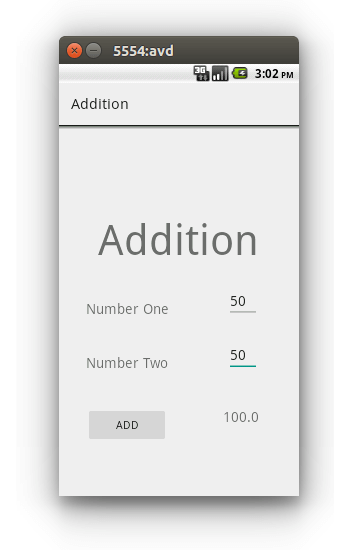
Save the above changes and run the application. You should have the
addition app running. Input the two numbers and you should be above to
view the result in the Text View.



No comments:
Post a Comment